


BILL AP & AR Business Payments
4.31.54K Reviews
App Specs
- Version
- 3.7.171
- Updated On
- License
- Free
- Downloads
- 500,000+
- Developer
- Bill.com Inc.
- Categories
- Business
- Platform
- Android
Screenshots
 Analysis by AppCompare
When a small business has bills waiting, customers asking about payments, and several people involved in approving money, the difficult part is rarely typing an amount. The real work is keeping the request, approval, payment, and record connected. BILL AP & AR Business Payments is built around that problem. I see it as a business payments app for people who want to handle bills and incoming payments online without relying entirely on email threads, paper files, or a desktop-only routine.
My first impression is that it makes the most sense as a companion to an organized accounts-payable and accounts-receivable process, rather than as a complete replacement for every accounting tool a company may use. It comes from Bill.com Inc., is free to install, and is rated for Everyone. The app has been available since December 16, 2015, and its current version is 3.7.171. Those details matter less than the practical question: can it help me move a payment through a business without losing track of who needs to act next?
Following a business payment from request to outcome
When I follow a business payment from its first request to its final status, I pay attention to more than whether money moved: I want to know who handled each decision and what still needs attention. That perspective is especially useful when a small team shares financial responsibilities, and it leads naturally to the question of how to keep that coordination clear without blurring account boundaries.
Starting with the situation that creates the work
Imagine I run a small design studio. A supplier sends an invoice for printing, while a client is waiting for my invoice and payment instructions. In a traditional setup, I might save the supplier document in one place, forward it to a partner for approval, check a bank account separately, and later try to remember whether the transaction was actually completed. On the incoming side, I may send an invoice from another system and keep checking email for a response.
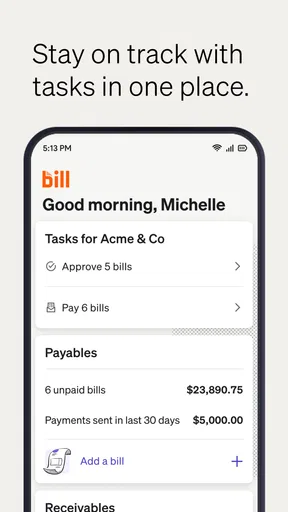
The attraction of BILL AP & AR is that it brings the two directions of business money into one mobile-oriented workspace: accounts payable for bills I need to handle and accounts receivable for money my business needs to collect. That distinction is important. It is not simply a personal bill-paying app with a business label. Its useful context is the movement of money between a company and its vendors or customers.
I would start by deciding which side of the workflow needs attention. If a supplier bill is the priority, I need to think about the internal path before payment: identifying the bill, checking its details, confirming that it belongs to the business, and getting the right person to approve it. If I am collecting from a customer, the starting point is different: the customer needs a clear request, and I need a way to see whether the payment has progressed.
This separation helps prevent a common mistake: treating every payment as an isolated transaction. A bill is not finished merely because I have seen it, and an invoice is not successful merely because I have sent it. The value of the app lies in giving the payment process a place to continue after that first action.
Worth Reading Before You Choose

EA SPORTS FC Mobile 26 Is a Bigger Football Game, but It Takes Time

Flipboard Shows What News Apps Must Do Beyond the Feed

Switching to Android Auto Means Rethinking Your Driving Routine

Google Calendar Makes a Crowded Week Easier to Manage

Ludo King Makes the Most of the Minutes Between Plans

Baby Panda World Brings Quick Play to Modern Phones, but Its Game Library Feels Busy
Moving a bill through review instead of paying too quickly
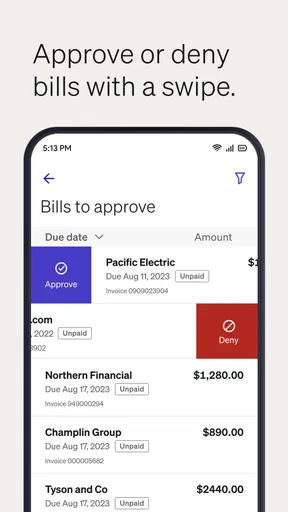
For an outgoing bill, I would use the app as part of a review routine rather than opening it only when a due date feels urgent. I would look at the bill, verify the vendor and amount, then consider whether another person needs to approve it before anything moves forward. That extra pause is useful for a small company where one person receives invoices, another manages cash, and a third has authority to approve spending.
The practical insight here is that mobile access changes when the work can happen, but it does not remove the need for a clear responsibility. If I am the owner, I may be able to review a payment while away from the office. If I am the person entering bills, I should not assume that being able to see a bill means I should be the final approver. The app can support the handoff, but the business still needs to decide who owns each decision.
I also would not use a quick glance as a substitute for checking the source document. A phone screen is convenient for confirming a familiar recurring bill, but less comfortable for examining a complicated invoice with several line items or unusual charges. My better workflow would be to use the mobile app for review, status checks, and timely action, while using a larger screen when the document needs careful comparison.
That is one of the trade-offs that is easy to miss in a short description. The app can make a payment process feel more available, but availability is not the same as accuracy. For recurring vendors, a fast review may be enough. For a new vendor or an unexpected amount, I would slow down and verify everything before approval.
Handling the approval handoff
The handoff is where many business payment systems either earn their place or become another source of confusion. In my example, the person who receives the printing invoice may not be the person who can approve it. A useful workflow lets the first person prepare the item and move it toward the decision-maker without turning the process into a chain of forwarded attachments.
I would treat the approval stage as a checkpoint with a specific question: is this bill ready to be paid, or does it need clarification? If the amount looks wrong, the vendor information is unfamiliar, or the expense belongs to a different project, the correct action is to resolve that issue before payment. A mobile workflow is most helpful when it makes those pending decisions visible instead of allowing them to disappear in a crowded inbox.
For a small team, this can reduce the awkward situation where someone asks, “Did you already pay that?” and the answer requires searching through messages. For a larger organization, the benefit depends on how carefully roles and internal procedures are set up. The app cannot decide whether a particular employee should approve a purchase, and it cannot replace a company’s spending policy. It can only be as orderly as the process built around it.
I would also establish a simple habit: every time I open a pending item, I should either advance it, send it back for clarification, or leave it deliberately pending for a reason. That prevents the mobile app from becoming a second inbox filled with items that look active but have no next step.
Paying the supplier and checking what happened
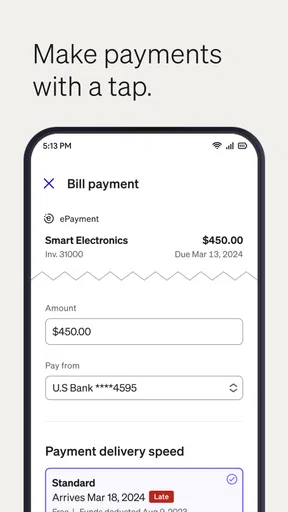
Once a bill has passed review, the next stage is the payment itself. This is where the app’s purpose becomes tangible: I am no longer just storing a document or discussing an expense; I am moving money through a business process. I would check the final details one more time before authorizing the payment, particularly if the bill was edited or questioned during approval.
After submitting the payment, I would not immediately mark the task as forgotten. The useful outcome is a visible status that helps me understand whether the payment is still progressing or whether I need to take another action. That matters when a vendor is waiting, when cash planning is tight, or when another team member needs a reliable answer.
This is also where BILL AP & AR can be more practical than a basic banking app. A bank app may show that money left an account, but it usually does not provide the same business context around the original bill, the internal approval, or the vendor relationship. On the other hand, a banking app may remain the better place for checking the account itself. I would use each tool for what it does best rather than expecting one screen to replace the entire financial stack.
For a recurring supplier, the repeat process should become easier because I already know what a normal bill looks like and who handles it. For an unusual payment, I would keep the review more deliberate. Speed is valuable, but a faster incorrect payment is still a poor result.
Turning the workflow around for incoming money
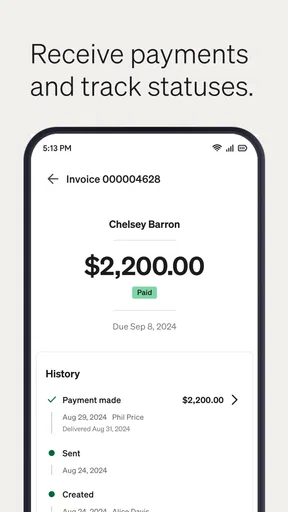
The accounts-receivable side starts with a different problem: I have completed work, delivered a product, or otherwise earned money, and now I need the customer to pay. I would use the app to keep the request connected to the collection process instead of sending an invoice and then tracking every follow-up manually.
In the design-studio example, I might send a customer invoice after completing a project. The important habit is to treat the invoice as the beginning of collection, not the end of the task. I would check whether the customer has acted, identify which payments still need attention, and follow up based on the actual status rather than sending the same reminder to everyone.
One non-obvious advantage of having both outgoing and incoming workflows nearby is the effect on cash awareness. A business can appear busy while still waiting for customers to pay, and it can also have money coming in while several supplier bills are approaching. Looking at only one side gives an incomplete picture. I would use the app to keep those two pressures in view, then make broader cash decisions with the company’s accounting records and bank information.
There is a human side to this as well. A customer follow-up is easier to write when I know whether the invoice is untouched, being processed, or already moving toward completion. I would avoid sending a generic “just checking in” message when the payment has already advanced. That small improvement can make collection feel more professional and less irritating for the customer.
Managing the handoff from the business to the customer
Incoming payments involve an external handoff, so the business does not control every step. I can issue the request and monitor progress, but the customer still has to review it and complete the payment. That means clarity matters. The invoice should match the agreed work, and the customer should not have to guess which amount or document is current.
For a small company, I would assign one person to watch receivables consistently rather than asking everyone to check occasionally. The app is more useful when someone owns the queue. If the person who sends invoices is unavailable, another team member should know how to identify what is waiting and what needs escalation.
A useful trade-off is that mobile monitoring can encourage faster follow-up, but it can also tempt me to chase payments too early. I would consider the customer relationship, the agreed terms, and the actual status before contacting them. A business payment app should support judgment, not turn every delay into an automatic confrontation.
What the completed workflow gives me
The best result is not merely that a bill gets paid or a customer sends money. The better result is a traceable sequence: the business received a financial request, the right person reviewed it, the payment moved forward, and the team can tell what happened afterward. That continuity is especially valuable when several people share responsibility.
In everyday use, I would expect the biggest benefit to appear in small moments. I can answer a vendor’s status question without reopening several email conversations. I can see which customer payment deserves attention during a short break. I can review an approval request while traveling instead of delaying it until I return to a desk. None of those actions is dramatic, but together they reduce the number of loose ends that make business finances stressful.
The app’s audience is also reflected in its reach: it has more than half a million installs, with a 4.3 average from roughly seven and a half thousand ratings. I read that as evidence that it has found a real audience among businesses looking for a more connected way to manage payments. It is not a reason to install it blindly, but it does make the product worth considering for a small team that has outgrown informal payment tracking.
Where the flow becomes less comfortable
The first friction point is screen size. A phone is excellent for checking a pending approval or responding to a straightforward payment task, but it is not my preferred environment for investigating a disputed invoice, comparing several documents, or reviewing a long financial history. Anyone expecting the mobile app to provide the comfort of a full desktop accounting workspace may feel constrained.
The second issue is process complexity. A simple business with one owner and a manageable number of vendors may move quickly. A company with layered approvals, unusual exceptions, or many departments will need more preparation. The app can fit into that environment, but the people using it must understand their roles. Without that discipline, mobile access may simply make an untidy process available in more places.
There is also a difference between payment management and complete accounting. I would not choose this app alone if my main requirement were deep bookkeeping, detailed financial reporting, inventory control, payroll, or broad business administration. A dedicated accounting platform may be the better foundation for those needs, with BILL AP & AR used alongside it if its payment workflow fits the company.
Another point is that the free price removes an installation barrier, but it should not remove the evaluation step. I would still test the actual workflow with a few normal bills and customer invoices before moving all payment activity into it. The important question is not whether I can open the app; it is whether my team can consistently move items from arrival to resolution without creating duplicate work.
Who should use it and who should look elsewhere
I would recommend BILL AP & AR to a small business owner, office manager, or finance team that needs a practical mobile view of bills and incoming payments. It is particularly appealing when approvals are handled by more than one person, when staff work away from a desk, or when email and spreadsheets have become unreliable for tracking payment status.
I would be more cautious for someone who only wants a simple personal bill reminder, because the business-oriented workflow may be more than necessary. I would also point a company with highly specialized accounting requirements toward a broader financial system first. If the business rarely has vendor bills, does not invoice customers, or already has a well-integrated process that everyone follows, adding another app may create more duplication than value.
Compared with paying directly through a bank, this app offers more business-process context. Compared with a general accounting package, it is more focused on the movement and follow-up of bills and receivables rather than every financial function. Compared with email and spreadsheets, it can provide a clearer shared path, but only if the team uses it as the agreed place for action instead of copying the old process into a new screen.
My recommendation after following the full path
I like BILL AP & AR because it addresses the part of business finance that often causes the most daily friction: getting a payment from “received” to “resolved” while several people may be involved. The ability to work with both outgoing bills and incoming customer payments gives it a useful scope, and mobile access makes timely approvals and status checks easier.
My recommendation is strongest for small and growing teams that need structure without immediately adopting a large, complicated financial system. I would begin with one clear workflow, define who reviews and approves, and use the app consistently for both vendor bills and customer follow-up. After that trial, the decision should be based on whether it reduces searching, repeated questions, and missed handoffs.
The app is most valuable when it becomes the shared route from financial request to confirmed outcome. It will not replace careful review, accounting judgment, or a company’s internal controls, and it is not the best fit for every financial task. But for a business that wants to pay bills and get paid online with a more visible process, I found it a sensible tool to keep close at hand.
Pros
- Streamlines invoice creation
- tracking
- and payment management in one place.
- Helps businesses monitor accounts receivable and outstanding customer balances.
- Supports faster payment collection with convenient digital payment options.
- Centralizes transaction records for easier financial organization and follow-up.
- Useful for improving visibility into business cash flow and payment activity.
Cons
- Advanced features may require a paid plan or additional business fees.
- The app may feel complex for freelancers with simple payment needs.
- Availability of payment methods can vary by country and business location.
- Requires accurate invoice data to prevent billing and reconciliation errors.
- Some users may need time to learn the platform’s full workflow.
FAQs for BILL AP & AR Business Payments
What is BILL AP & AR Business Payments used for?
BILL AP & AR Business Payments is a business finance platform designed to help companies manage accounts payable and accounts receivable in one place. It can be used to schedule and send vendor payments, create invoices, collect money from customers, track payment activity, and organize approval workflows. It is primarily intended for businesses rather than personal bill payment.
Is BILL AP & AR Business Payments suitable for small businesses and freelancers?
The app can be useful for small businesses, growing companies, and independent professionals who need a more organized way to handle bills, invoices, and incoming payments. Its value depends on the company’s payment volume and accounting setup. Freelancers with only occasional invoices may find it more feature-rich than necessary, while businesses managing multiple vendors or clients may benefit from its centralized workflow.
Can I connect BILL with my accounting software or bank account?
BILL is designed to work alongside business accounting and banking processes, allowing users to connect financial information and reduce manual data entry. Available integrations, supported banks, synchronization options, and accounting features can vary according to the selected plan, region, and account configuration. Before downloading or subscribing, users should confirm that their accounting software and financial institutions are supported.
Is BILL AP & AR Business Payments secure for business transactions?
Because the platform handles sensitive financial information and payment instructions, security is an important consideration. BILL uses account protection, authentication controls, encryption, and transaction-monitoring practices intended to safeguard business data and payments. However, no online service eliminates every risk. Users should enable available security features, use strong unique passwords, review payment approvals carefully, and keep their devices and email accounts protected.
Are there fees for using BILL AP & AR Business Payments?
BILL may charge fees depending on the services a business uses, such as accounts payable payments, invoice collection, payment methods, expedited processing, subscriptions, or additional users. Pricing and transaction costs can change and may differ by plan or payment type. It is important to review the current pricing page and service terms before signing up, especially if your business processes frequent or high-value payments.


